
JavaScript实现两个多选框的移动数据项并自动排序功能
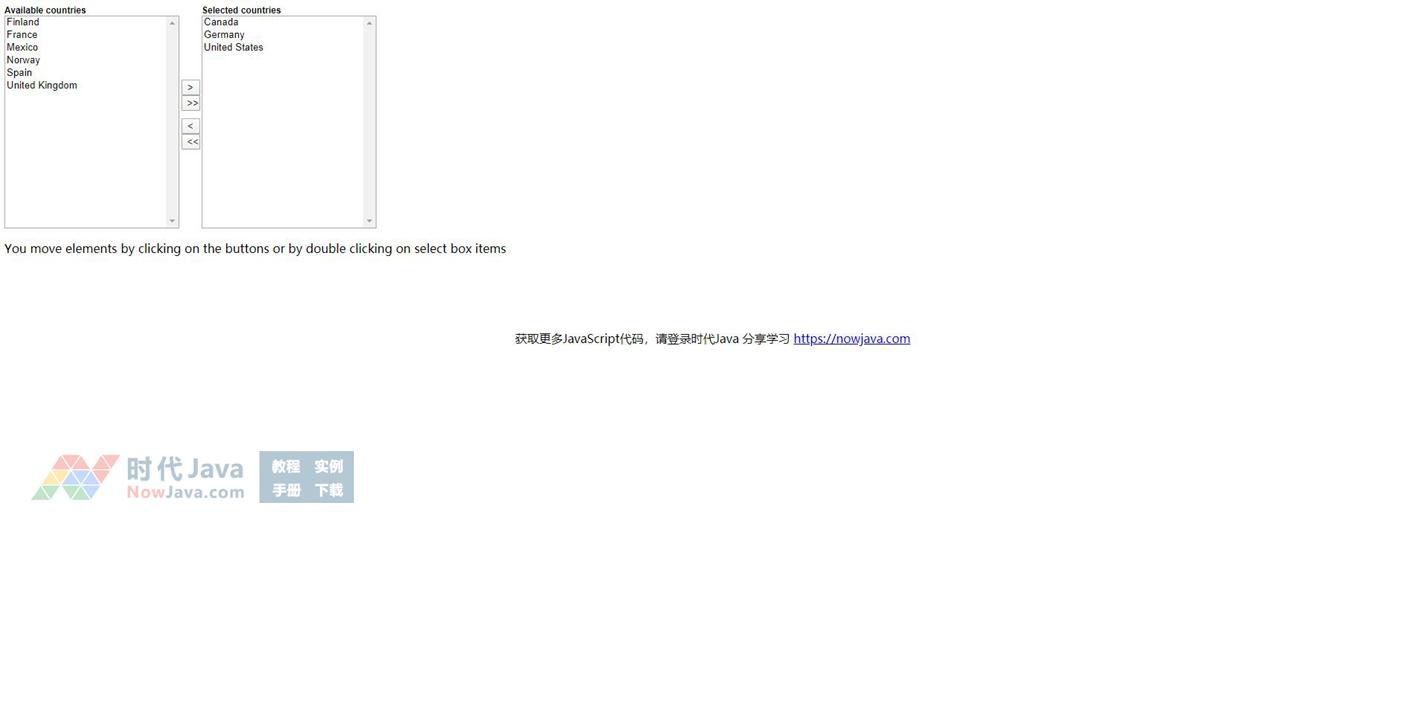
本脚本实现了在两个多选框内移动数据项的功能。同时脚本还可以对多选框内的数据项进行自动排序,点提交按钮,系统只提交选中的项目。而且本脚本的调用非常简单,只需要简单的几行代码即可
在网页<head>区添加以下代码
[code]
<style type="text/css">
.multipleSelectBoxControl span{ /* Labels above select boxes*/
font-family:arial;
font-size:11px;
font-weight:bold;
}
.multipleSelectBoxControl div select{ /* Select box layout */
font-family:arial;
height:100%;
}
.multipleSelectBoxControl input{ /* Small butons */
width:25px;
}
.multipleSelectBoxControl div{
float:left;
}
.multipleSelectBoxDiv
</style>
<script type="text/javascript">
/************************************************************************************************************
(C) www.dhtmlgoodies.com, October 2005
Download from sharejs.com
This is a script from www.dhtmlgoodies.com. You will find this and a lot of other scripts at our website.
Terms of use:
You are free to use this script as long as the copyright message is kept intact. However, you may not
redistribute, sell or repost it without our permission.
Thank you!
www.dhtmlgoodies.com
Alf Magne Kalleland
************************************************************************************************************/
var fromBoxArray = new Array();
var toBoxArray = new Array();
var selectBoxIndex = 0;
var arrayOfItemsToSelect = new Array();
function moveSingleElement()
{
var selectBoxIndex = this.parentNode.parentNode.id.replace(/[^\d]/g,'');
var tmpFromBox;
var tmpToBox;
if(this.tagName.toLowerCase()=='select'){
tmpFromBox = this;
if(tmpFromBox==fromBoxArray[selectBoxIndex])tmpToBox = toBoxArray[selectBoxIndex]; else tmpToBox
= fromBoxArray[selectBoxIndex];
}else{
if(this.value.indexOf('>')>=0){
tmpFromBox = fromBoxArray[selectBoxIndex];
tmpToBox = toBoxArray[selectBoxIndex];
}else{
tmpFromBox = toBoxArray[selectBoxIndex];
tmpToBox = fromBoxArray[selectBoxIndex];
}
}
for(var no=0;no<tmpFromBox.options.length;no++){
if(tmpFromBox.options[no].selected){
tmpFromBox.options[no].selected = false;
tmpToBox.options[tmpToBox.options.length] = new
Option(tmpFromBox.options[no].text,tmpFromBox.options[no].value);
for(var no2=no;no2<(tmpFromBox.options.length-1);no2++){
tmpFromBox.options[no2].value = tmpFromBox.options[no2+1].value;
tmpFromBox.options[no2].text = tmpFromBox.options[no2+1].text;
tmpFromBox.options[no2].selected = tmpFromBox.options[no2+1].selected;
}
no = no -1;
tmpFromBox.options.length = tmpFromBox.options.length-1;
}
}
var tmpTextArray = new Array();
for(var no=0;no<tmpFromBox.options.length;no++){
tmpTextArray.push(tmpFromBox.options[no].text + '___' + tmpFromBox.options[no].value);
}
tmpTextArray.sort();
var tmpTextArray2 = new Array();
for(var no=0;no<tmpToBox.options.length;no++){
tmpTextArray2.push(tmpToBox.options[no].text + '___' + tmpToBox.options[no].value);
}
tmpTextArray2.sort();
for(var no=0;no<tmpTextArray.length;no++){
var items = tmpTextArray[no].split('___');
tmpFromBox.options[no] = new Option(items[0],items[1]);
}
for(var no=0;no<tmpTextArray2.length;no++){
var items = tmpTextArray2[no].split('___');
tmpToBox.options[no] = new Option(items[0],items[1]);
}
}
function sortAllElement(boxRef)
{
var tmpTextArray2 = new Array();
for(var no=0;no<boxRef.options.length;no++){
tmpTextArray2.push(boxRef.options[no].text + '___' + boxRef.options[no].value);
}
tmpTextArray2.sort();
for(var no=0;no<tmpTextArray2.length;no++){
var items = tmpTextArray2[no].split('___');
boxRef.options[no] = new Option(items[0],items[1]);
}
}
function moveAllElements()
{
var selectBoxIndex = this.parentNode.parentNode.id.replace(/[^\d]/g,'');
var tmpFromBox;
var tmpToBox;
if(this.value.indexOf('>')>=0){
tmpFromBox = fromBoxArray[selectBoxIndex];
tmpToBox = toBoxArray[selectBoxIndex];
}else{
tmpFromBox = toBoxArray[selectBoxIndex];
tmpToBox = fromBoxArray[selectBoxIndex];
}
for(var no=0;no<tmpFromBox.options.length;no++){
tmpToBox.options[tmpToBox.options.length] = new
Option(tmpFromBox.options[no].text,tmpFromBox.options[no].value);
}
tmpFromBox.options.length=0;
sortAllElement(tmpToBox);
}
/* This function highlights options in the "to-boxes". It is needed if the values should be remembered after
submit. Call this function onsubmit for your form */
function multipleSelectOnSubmit()
{
for(var no=0;no<arrayOfItemsToSelect.length;no++){
var obj = arrayOfItemsToSelect[no];
for(var no2=0;no2<obj.options.length;no2++){
obj.options[no2].selected = true;
}
}
}
function createMovableOptions(fromBox,toBox,totalWidth,totalHeight,labelLeft,labelRight)
{
fromObj = document.getElementById(fromBox);
toObj = document.getElementById(toBox);
arrayOfItemsToSelect[arrayOfItemsToSelect.length] = toObj;
fromObj.ondblclick = moveSingleElement;
toObj.ondblclick = moveSingleElement;
fromBoxArray.push(fromObj);
toBoxArray.push(toObj);
var parentEl = fromObj.parentNode;
var parentDiv = document.createElement('DIV');
parentDiv.className='multipleSelectBoxControl';
parentDiv.id = 'selectBoxGroup' + selectBoxIndex;
parentDiv.style.width = totalWidth + 'px';
parentDiv.style.height = totalHeight + 'px';
parentEl.insertBefore(parentDiv,fromObj);
var subDiv = document.createElement('DIV');
subDiv.style.width = (Math.floor(totalWidth/2) - 15) + 'px';
fromObj.style.width = (Math.floor(totalWidth/2) - 15) + 'px';
var label = document.createElement('SPAN');
label.innerHTML = labelLeft;
subDiv.appendChild(label);
subDiv.appendChild(fromObj);
subDiv.className = 'multipleSelectBoxDiv';
parentDiv.appendChild(subDiv);
var buttonDiv = document.createElement('DIV');
buttonDiv.style.verticalAlign = 'middle';
buttonDiv.style.paddingTop = (totalHeight/2) - 50 + 'px';
buttonDiv.style.width = '30px';
buttonDiv.style.textAlign = 'center';
parentDiv.appendChild(buttonDiv);
var buttonRight = document.createElement('INPUT');
buttonRight.type='button';
buttonRight.value = '>';
buttonDiv.appendChild(buttonRight);
buttonRight.onclick = moveSingleElement;
var buttonAllRight = document.createElement('INPUT');
buttonAllRight.type='button';
buttonAllRight.value = '>>';
buttonAllRight.onclick = moveAllElements;
buttonDiv.appendChild(buttonAllRight);
var buttonLeft = document.createElement('INPUT');
buttonLeft.style.marginTop='10px';
buttonLeft.type='button';
buttonLeft.value = '<';
buttonLeft.onclick = moveSingleElement;
buttonDiv.appendChild(buttonLeft);
var buttonAllLeft = document.createElement('INPUT');
buttonAllLeft.type='button';
buttonAllLeft.value = '<<';
buttonAllLeft.onclick = moveAllElements;
buttonDiv.appendChild(buttonAllLeft);
var subDiv = document.createElement('DIV');
subDiv.style.width = (Math.floor(totalWidth/2) - 15) + 'px';
toObj.style.width = (Math.floor(totalWidth/2) - 15) + 'px';
var label = document.createElement('SPAN');
label.innerHTML = labelRight;
subDiv.appendChild(label);
subDiv.appendChild(toObj);
parentDiv.appendChild(subDiv);
toObj.style.height = (totalHeight - label.offsetHeight) + 'px';
fromObj.style.height = (totalHeight - label.offsetHeight) + 'px';
selectBoxIndex++;
}
</script>
[/code]
在网页<body>区添加以下代码
[code]
<form method="post" action="multiple_select.html" onsubmit="multipleSelectOnSubmit()">
<select multiple name="fromBox" id="fromBox">
<option value="3">Finland</option>
<option value="4">France</option>
<option value="6">Mexico</option>
<option value="1">Norway</option>
<option value="5">Spain</option>
<option value="2">United Kingdom</option>
</select>
<select multiple name="toBox" id="toBox">
<option value="12">Canada</option>
<option value="13">Germany</option>
<option value="11">United States</option>
</select>
</form>
<script type="text/javascript">
createMovableOptions("fromBox","toBox",500,300,'Available countries','Selected countries');
</script>
[/code]
程序调用说明:
首先类似下面的代码创建两个多选框
[code]
<select multiple name="fromBox" id="fromBox">
<option value="3">Finland</option>
<option value="4">France</option>
<option value="6">Mexico</option>
<option value="1">Norway</option>
<option value="5">Spain</option>
<option value="2">United Kingdom</option>
</select>
<select multiple name="toBox[]" id="topBox">
<option value="12">Canada</option>
<option value="13">Germany</option>
<option value="11">United States</option>
</select>
[/code]
然后调用一个Javascript函数进行初始化
[code]
<script type="text/javascript">
createMovableOptions("fromBox","toBox",500,300,'Available countries','Selected countries');
</script>
[/code]
该函数的各个参数说明如下:
"fromBox" - 第一个多选框的ID(<select multiple name="fromBox" id="fromBox">)
"toBox" - 第二个多选框的ID(<select multiple name="toBox[]" id="toBox">)
500 - 整个操作界面的宽度
300 - 整个操作界面的高度
"Available countries" - 第一个多选框上方的文本
"Selected countries" - 第二个多选框上方的文本
提交表单
当你点击提交按钮时只提交被选中的项目. 要实现这个功能可以为表单添加一个OnSubmit事件.如下:
[code]
<form method="post" action="multiple_select.html" onsubmit="multipleSelectOnSubmit()">
[/code]
在网页<head>区添加以下代码
[code]
<style type="text/css">
.multipleSelectBoxControl span{ /* Labels above select boxes*/
font-family:arial;
font-size:11px;
font-weight:bold;
}
.multipleSelectBoxControl div select{ /* Select box layout */
font-family:arial;
height:100%;
}
.multipleSelectBoxControl input{ /* Small butons */
width:25px;
}
.multipleSelectBoxControl div{
float:left;
}
.multipleSelectBoxDiv
</style>
<script type="text/javascript">
/************************************************************************************************************
(C) www.dhtmlgoodies.com, October 2005
Download from sharejs.com
This is a script from www.dhtmlgoodies.com. You will find this and a lot of other scripts at our website.
Terms of use:
You are free to use this script as long as the copyright message is kept intact. However, you may not
redistribute, sell or repost it without our permission.
Thank you!
www.dhtmlgoodies.com
Alf Magne Kalleland
************************************************************************************************************/
var fromBoxArray = new Array();
var toBoxArray = new Array();
var selectBoxIndex = 0;
var arrayOfItemsToSelect = new Array();
function moveSingleElement()
{
var selectBoxIndex = this.parentNode.parentNode.id.replace(/[^\d]/g,'');
var tmpFromBox;
var tmpToBox;
if(this.tagName.toLowerCase()=='select'){
tmpFromBox = this;
if(tmpFromBox==fromBoxArray[selectBoxIndex])tmpToBox = toBoxArray[selectBoxIndex]; else tmpToBox
= fromBoxArray[selectBoxIndex];
}else{
if(this.value.indexOf('>')>=0){
tmpFromBox = fromBoxArray[selectBoxIndex];
tmpToBox = toBoxArray[selectBoxIndex];
}else{
tmpFromBox = toBoxArray[selectBoxIndex];
tmpToBox = fromBoxArray[selectBoxIndex];
}
}
for(var no=0;no<tmpFromBox.options.length;no++){
if(tmpFromBox.options[no].selected){
tmpFromBox.options[no].selected = false;
tmpToBox.options[tmpToBox.options.length] = new
Option(tmpFromBox.options[no].text,tmpFromBox.options[no].value);
for(var no2=no;no2<(tmpFromBox.options.length-1);no2++){
tmpFromBox.options[no2].value = tmpFromBox.options[no2+1].value;
tmpFromBox.options[no2].text = tmpFromBox.options[no2+1].text;
tmpFromBox.options[no2].selected = tmpFromBox.options[no2+1].selected;
}
no = no -1;
tmpFromBox.options.length = tmpFromBox.options.length-1;
}
}
var tmpTextArray = new Array();
for(var no=0;no<tmpFromBox.options.length;no++){
tmpTextArray.push(tmpFromBox.options[no].text + '___' + tmpFromBox.options[no].value);
}
tmpTextArray.sort();
var tmpTextArray2 = new Array();
for(var no=0;no<tmpToBox.options.length;no++){
tmpTextArray2.push(tmpToBox.options[no].text + '___' + tmpToBox.options[no].value);
}
tmpTextArray2.sort();
for(var no=0;no<tmpTextArray.length;no++){
var items = tmpTextArray[no].split('___');
tmpFromBox.options[no] = new Option(items[0],items[1]);
}
for(var no=0;no<tmpTextArray2.length;no++){
var items = tmpTextArray2[no].split('___');
tmpToBox.options[no] = new Option(items[0],items[1]);
}
}
function sortAllElement(boxRef)
{
var tmpTextArray2 = new Array();
for(var no=0;no<boxRef.options.length;no++){
tmpTextArray2.push(boxRef.options[no].text + '___' + boxRef.options[no].value);
}
tmpTextArray2.sort();
for(var no=0;no<tmpTextArray2.length;no++){
var items = tmpTextArray2[no].split('___');
boxRef.options[no] = new Option(items[0],items[1]);
}
}
function moveAllElements()
{
var selectBoxIndex = this.parentNode.parentNode.id.replace(/[^\d]/g,'');
var tmpFromBox;
var tmpToBox;
if(this.value.indexOf('>')>=0){
tmpFromBox = fromBoxArray[selectBoxIndex];
tmpToBox = toBoxArray[selectBoxIndex];
}else{
tmpFromBox = toBoxArray[selectBoxIndex];
tmpToBox = fromBoxArray[selectBoxIndex];
}
for(var no=0;no<tmpFromBox.options.length;no++){
tmpToBox.options[tmpToBox.options.length] = new
Option(tmpFromBox.options[no].text,tmpFromBox.options[no].value);
}
tmpFromBox.options.length=0;
sortAllElement(tmpToBox);
}
/* This function highlights options in the "to-boxes". It is needed if the values should be remembered after
submit. Call this function onsubmit for your form */
function multipleSelectOnSubmit()
{
for(var no=0;no<arrayOfItemsToSelect.length;no++){
var obj = arrayOfItemsToSelect[no];
for(var no2=0;no2<obj.options.length;no2++){
obj.options[no2].selected = true;
}
}
}
function createMovableOptions(fromBox,toBox,totalWidth,totalHeight,labelLeft,labelRight)
{
fromObj = document.getElementById(fromBox);
toObj = document.getElementById(toBox);
arrayOfItemsToSelect[arrayOfItemsToSelect.length] = toObj;
fromObj.ondblclick = moveSingleElement;
toObj.ondblclick = moveSingleElement;
fromBoxArray.push(fromObj);
toBoxArray.push(toObj);
var parentEl = fromObj.parentNode;
var parentDiv = document.createElement('DIV');
parentDiv.className='multipleSelectBoxControl';
parentDiv.id = 'selectBoxGroup' + selectBoxIndex;
parentDiv.style.width = totalWidth + 'px';
parentDiv.style.height = totalHeight + 'px';
parentEl.insertBefore(parentDiv,fromObj);
var subDiv = document.createElement('DIV');
subDiv.style.width = (Math.floor(totalWidth/2) - 15) + 'px';
fromObj.style.width = (Math.floor(totalWidth/2) - 15) + 'px';
var label = document.createElement('SPAN');
label.innerHTML = labelLeft;
subDiv.appendChild(label);
subDiv.appendChild(fromObj);
subDiv.className = 'multipleSelectBoxDiv';
parentDiv.appendChild(subDiv);
var buttonDiv = document.createElement('DIV');
buttonDiv.style.verticalAlign = 'middle';
buttonDiv.style.paddingTop = (totalHeight/2) - 50 + 'px';
buttonDiv.style.width = '30px';
buttonDiv.style.textAlign = 'center';
parentDiv.appendChild(buttonDiv);
var buttonRight = document.createElement('INPUT');
buttonRight.type='button';
buttonRight.value = '>';
buttonDiv.appendChild(buttonRight);
buttonRight.onclick = moveSingleElement;
var buttonAllRight = document.createElement('INPUT');
buttonAllRight.type='button';
buttonAllRight.value = '>>';
buttonAllRight.onclick = moveAllElements;
buttonDiv.appendChild(buttonAllRight);
var buttonLeft = document.createElement('INPUT');
buttonLeft.style.marginTop='10px';
buttonLeft.type='button';
buttonLeft.value = '<';
buttonLeft.onclick = moveSingleElement;
buttonDiv.appendChild(buttonLeft);
var buttonAllLeft = document.createElement('INPUT');
buttonAllLeft.type='button';
buttonAllLeft.value = '<<';
buttonAllLeft.onclick = moveAllElements;
buttonDiv.appendChild(buttonAllLeft);
var subDiv = document.createElement('DIV');
subDiv.style.width = (Math.floor(totalWidth/2) - 15) + 'px';
toObj.style.width = (Math.floor(totalWidth/2) - 15) + 'px';
var label = document.createElement('SPAN');
label.innerHTML = labelRight;
subDiv.appendChild(label);
subDiv.appendChild(toObj);
parentDiv.appendChild(subDiv);
toObj.style.height = (totalHeight - label.offsetHeight) + 'px';
fromObj.style.height = (totalHeight - label.offsetHeight) + 'px';
selectBoxIndex++;
}
</script>
[/code]
在网页<body>区添加以下代码
[code]
<form method="post" action="multiple_select.html" onsubmit="multipleSelectOnSubmit()">
<select multiple name="fromBox" id="fromBox">
<option value="3">Finland</option>
<option value="4">France</option>
<option value="6">Mexico</option>
<option value="1">Norway</option>
<option value="5">Spain</option>
<option value="2">United Kingdom</option>
</select>
<select multiple name="toBox" id="toBox">
<option value="12">Canada</option>
<option value="13">Germany</option>
<option value="11">United States</option>
</select>
</form>
<script type="text/javascript">
createMovableOptions("fromBox","toBox",500,300,'Available countries','Selected countries');
</script>
[/code]
程序调用说明:
首先类似下面的代码创建两个多选框
[code]
<select multiple name="fromBox" id="fromBox">
<option value="3">Finland</option>
<option value="4">France</option>
<option value="6">Mexico</option>
<option value="1">Norway</option>
<option value="5">Spain</option>
<option value="2">United Kingdom</option>
</select>
<select multiple name="toBox[]" id="topBox">
<option value="12">Canada</option>
<option value="13">Germany</option>
<option value="11">United States</option>
</select>
[/code]
然后调用一个Javascript函数进行初始化
[code]
<script type="text/javascript">
createMovableOptions("fromBox","toBox",500,300,'Available countries','Selected countries');
</script>
[/code]
该函数的各个参数说明如下:
"fromBox" - 第一个多选框的ID(<select multiple name="fromBox" id="fromBox">)
"toBox" - 第二个多选框的ID(<select multiple name="toBox[]" id="toBox">)
500 - 整个操作界面的宽度
300 - 整个操作界面的高度
"Available countries" - 第一个多选框上方的文本
"Selected countries" - 第二个多选框上方的文本
提交表单
当你点击提交按钮时只提交被选中的项目. 要实现这个功能可以为表单添加一个OnSubmit事件.如下:
[code]
<form method="post" action="multiple_select.html" onsubmit="multipleSelectOnSubmit()">
[/code]
下载方法:
1、请用微信扫描下方二维码关注时代Java公众号,或者微信搜索时代Java或NowJava关注。
(如已经关注,请直接发送编号)

(如已经关注,请直接发送编号)
2、在时代Java公众号里发送编号:5776
5776
3、发送后,将立刻收到 “验证码已经接收成功” 的回复,即可选择线路下载:
通用网络下载移动网络下载电信网络下载
本文系作者在时代Java发表,未经许可,不得转载。
如有侵权,请联系nowjava@qq.com删除。
编辑于

关注时代Java
下载资源
下载订阅
- 后台管理UI模板框架 AdminLTE 3.0中文免费下载,AdminLTE_CN-3.0.5.zip 官方中文翻译版。
- Java 连接 MySQL 8.0 以上 JDBC 驱动包下载 mysql-connector-java-8.0.21.jar 官方最新版
- windows Java/JDK14下载 jdk-14.0.2_windows-x64_bin.exe 官方安装版
- Java JDBC 驱动包下载,MySQL 8及以上适用, mysql-connector-java-8.0.22.jar 官方版。
- 在线HTML编辑器 CKEditor5 下载和使用方法,支持多种模式。
- Windows 版 64位 Redis 6.0下载,最新官方源码由Cygwin软件编译。
- Eclipse Spring Boot maven web demo 简单项目实例
- Windows Java/JDK15下载 jdk-15_windows-x64_bin.exe 官方安装版
- html5手机触屏左右滑动图动画切换效果
关注时代Java