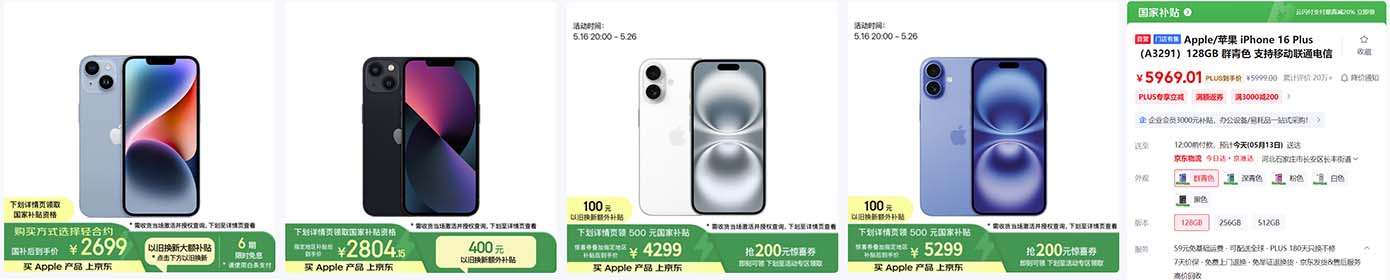
既可以编辑又可以下拉的select box下拉列表框实现
HTML里的select box只能下拉选择,是不可以编辑的,本范例实现了一个既可以编辑又可以下拉的select box,在很多项目中能够用到
在网页<head>区添加以下代码
[code]
<style type="text/css">
body{
background-image:url("https://nowjava.com/static/uv/i/nowj_logo_small.png");
background-repeat:no-repeat;
padding-top:85px;
font-family: Trebuchet MS, Lucida Sans Unicode, Arial, sans-serif;
font-size:0.9em;
line-height:130%;
}
.selectBoxArrow{
margin-top:1px;
float:left;
position:absolute;
right:1px;
}
.selectBoxInput{
border:0px;
padding-left:1px;
height:16px;
position:absolute;
top:0px;
left:0px;
}
.selectBox{
border:1px solid #7f9db9;
height:20px;
}
.selectBoxOptionContainer{
position:absolute;
border:1px solid #7f9db9;
height:100px;
background-color:#FFF;
left:-1px;
top:20px;
visibility:hidden;
overflow:auto;
}
.selectBoxAnOption{
font-family:arial;
font-size:12px;
cursor:default;
margin:1px;
overflow:hidden;
white-space:nowrap;
}
.selectBoxIframe{
position:absolute;
background-color:#FFF;
border:0px;
z-index:999;
}
</style>
<script type="text/javascript">
/************************************************************************************************************
Editable select
Copyright (C) September 2005 DTHMLGoodies.com, Alf Magne Kalleland
This library is free software; you can redistribute it and/or
modify it under the terms of the GNU Lesser General Public
License as published by the Free Software Foundation; either
version 2.1 of the License, or (at your option) any later version.
This library is distributed in the hope that it will be useful,
but WITHOUT ANY WARRANTY; without even the implied warranty of
MERCHANTABILITY or FITNESS FOR A PARTICULAR PURPOSE. See the GNU
Lesser General Public License for more details.
You should have received a copy of the GNU Lesser General Public
License along with this library; if not, write to the Free Software
Foundation, Inc., 51 Franklin Street, Fifth Floor, Boston, MA 02110-1301 USA
Dhtmlgoodies.com., hereby disclaims all copyright interest in this script
written by Alf Magne Kalleland.
Alf Magne Kalleland, 2006
Owner of DHTMLgoodies.com
************************************************************************************************************/
// Path to arrow images
var arrowImage = 'images/select_arrow.gif'; // Regular arrow
var arrowImageOver = 'images/select_arrow_over.gif'; // Mouse over
var arrowImageDown = 'images/select_arrow_down.gif'; // Mouse down
var selectBoxIds = 0;
var currentlyOpenedOptionBox = false;
var editableSelect_activeArrow = false;
function selectBox_switchImageUrl()
{
if(this.src.indexOf(arrowImage)>=0){
this.src = this.src.replace(arrowImage,arrowImageOver);
}else{
this.src = this.src.replace(arrowImageOver,arrowImage);
}
}
function selectBox_showOptions()
{
if(editableSelect_activeArrow && editableSelect_activeArrow!=this){
editableSelect_activeArrow.src = arrowImage;
}
editableSelect_activeArrow = this;
var numId = this.id.replace(/[^\d]/g,'');
var optionDiv = document.getElementById('selectBoxOptions' + numId);
if(optionDiv.style.display=='block'){
optionDiv.style.display='none';
if(navigator.userAgent.indexOf('MSIE')>=0)document.getElementById('selectBoxIframe' + numId).style.display='none';
this.src = arrowImageOver;
}else{
optionDiv.style.display='block';
if(navigator.userAgent.indexOf('MSIE')>=0)document.getElementById('selectBoxIframe' + numId).style.display='block';
this.src = arrowImageDown;
if(currentlyOpenedOptionBox && currentlyOpenedOptionBox!=optionDiv)currentlyOpenedOptionBox.style.display='none';
currentlyOpenedOptionBox= optionDiv;
}
}
function selectOptionValue()
{
var parentNode = this.parentNode.parentNode;
var textInput = parentNode.getElementsByTagName('INPUT')[0];
textInput.value = this.innerHTML;
this.parentNode.style.display='none';
document.getElementById('arrowSelectBox' + parentNode.id.replace(/[^\d]/g,'')).src = arrowImageOver;
if(navigator.userAgent.indexOf('MSIE')>=0)document.getElementById('selectBoxIframe' + parentNode.id.replace(/[^\d]/g,'')).style.display='none';
}
var activeOption;
function highlightSelectBoxOption()
{
if(this.style.backgroundColor=='#316AC5'){
this.style.backgroundColor='';
this.style.color='';
}else{
this.style.backgroundColor='#316AC5';
this.style.color='#FFF';
}
if(activeOption){
activeOption.style.backgroundColor='';
activeOption.style.color='';
}
activeOption = this;
}
function createEditableSelect(dest)
{
dest.className='selectBoxInput';
var div = document.createElement('DIV');
div.style.styleFloat = 'left';
div.style.width = dest.offsetWidth + 16 + 'px';
div.style.position = 'relative';
div.id = 'selectBox' + selectBoxIds;
var parent = dest.parentNode;
parent.insertBefore(div,dest);
div.appendChild(dest);
div.className='selectBox';
div.style.zIndex = 10000 - selectBoxIds;
var img = document.createElement('IMG');
img.src = arrowImage;
img.className = 'selectBoxArrow';
img.onmouseover = selectBox_switchImageUrl;
img.onmouseout = selectBox_switchImageUrl;
img.onclick = selectBox_showOptions;
img.id = 'arrowSelectBox' + selectBoxIds;
div.appendChild(img);
var optionDiv = document.createElement('DIV');
optionDiv.id = 'selectBoxOptions' + selectBoxIds;
optionDiv.className='selectBoxOptionContainer';
optionDiv.style.width = div.offsetWidth-2 + 'px';
div.appendChild(optionDiv);
if(navigator.userAgent.indexOf('MSIE')>=0){
var iframe = document.createElement('<IFRAME src="about:blank" frameborder=0>');
iframe.style.width = optionDiv.style.width;
iframe.style.height = optionDiv.offsetHeight + 'px';
iframe.style.display='none';
iframe.id = 'selectBoxIframe' + selectBoxIds;
div.appendChild(iframe);
}
if(dest.getAttribute('selectBoxOptions')){
var options = dest.getAttribute('selectBoxOptions').split(';');
var optionsTotalHeight = 0;
var optionArray = new Array();
for(var no=0;no<options.length;no++){
var anOption = document.createElement('DIV');
anOption.innerHTML = options[no];
anOption.className='selectBoxAnOption';
anOption.onclick = selectOptionValue;
anOption.style.width = optionDiv.style.width.replace('px','') - 2 + 'px';
anOption.onmouseover = highlightSelectBoxOption;
optionDiv.appendChild(anOption);
optionsTotalHeight = optionsTotalHeight + anOption.offsetHeight;
optionArray.push(anOption);
}
if(optionsTotalHeight > optionDiv.offsetHeight){
for(var no=0;no<optionArray.length;no++){
optionArray[no].style.width = optionDiv.style.width.replace('px','') - 22 + 'px';
}
}
optionDiv.style.display='none';
optionDiv.style.visibility='visible';
}
selectBoxIds = selectBoxIds + 1;
}
</script>
[/code]
在网页<body>区添加以下代码
[code]
<p>This widget uses javascript to transform this:</p>
<table border="0">
<tr>
<td>Where do you come from?</td>
<td><input type="text" name="myText_ex" value="Norway" selectBoxOptions="Canada;Denmark;Finland;Germany;Mexico;Norway;Sweden;United Kingdom;United States"></td>
</tr>
<tr>
<td>What is your name?</td>
<td><input type="text" name="myText_ex2" value="" selectBoxOptions="Amy;Andrew;Carol;Jennifer;Jim;Tim;Tommy;Vince"></td>
</tr>
</table>
<p>Into this:</p>
<table border="0">
<tr>
<td>Where do you come from?</td>
<td><input type="text" name="myText" value="Norway" selectBoxOptions="Canada;Denmark;Finland;Germany;Mexico;Norway;Sweden;United Kingdom;United States"></td>
</tr>
<tr>
<td>What is your name?</td>
<td><input type="text" name="myText2" value="" selectBoxOptions="Amy;Andrew;Carol;Jennifer;Jim;Tim;Tommy;Vince"></td>
</tr>
</table>
<p>I.e.: A combination of text- and selectbox. You can type in a value or choose from the list,//www.sharejs.net</p>
</form>
<script type="text/javascript">
createEditableSelect(document.forms[0].myText);
createEditableSelect(document.forms[0].myText2);
</script>
[/code]
程序使用说明:
要运行这个脚本,只需要做两步操作:
添加属性到文本框,<INPUT type="text"> 如:
[code]
<input type="text" name="myText" value="Norway" selectBoxOptions="Canada;Denmark;Finland;Germany;Mexico; Norway;Sweden;United Kingdom;United States">
[/code]
在input文本框下方,调用 createEditableSelect() 函数. 如:
[code]
createEditableSelect(document.forms[0].myText);
[/code]
Javascript 变量说明
定义下拉箭头图片的路径
var arrowImage = 'images/select_arrow.gif'; // 默认箭头
var arrowImageOver = 'images/select_arrow_over.gif'; // 鼠标滑过
var arrowImageDown = 'images/select_arrow_down.gif'; // 鼠标按下
要使用不用的图片路径,修改上面的变量即可
脚本里用到的三个图片下载
点击鼠标右键另存这些图片到images文件夹下
在网页<head>区添加以下代码
[code]
<style type="text/css">
body{
background-image:url("https://nowjava.com/static/uv/i/nowj_logo_small.png");
background-repeat:no-repeat;
padding-top:85px;
font-family: Trebuchet MS, Lucida Sans Unicode, Arial, sans-serif;
font-size:0.9em;
line-height:130%;
}
.selectBoxArrow{
margin-top:1px;
float:left;
position:absolute;
right:1px;
}
.selectBoxInput{
border:0px;
padding-left:1px;
height:16px;
position:absolute;
top:0px;
left:0px;
}
.selectBox{
border:1px solid #7f9db9;
height:20px;
}
.selectBoxOptionContainer{
position:absolute;
border:1px solid #7f9db9;
height:100px;
background-color:#FFF;
left:-1px;
top:20px;
visibility:hidden;
overflow:auto;
}
.selectBoxAnOption{
font-family:arial;
font-size:12px;
cursor:default;
margin:1px;
overflow:hidden;
white-space:nowrap;
}
.selectBoxIframe{
position:absolute;
background-color:#FFF;
border:0px;
z-index:999;
}
</style>
<script type="text/javascript">
/************************************************************************************************************
Editable select
Copyright (C) September 2005 DTHMLGoodies.com, Alf Magne Kalleland
This library is free software; you can redistribute it and/or
modify it under the terms of the GNU Lesser General Public
License as published by the Free Software Foundation; either
version 2.1 of the License, or (at your option) any later version.
This library is distributed in the hope that it will be useful,
but WITHOUT ANY WARRANTY; without even the implied warranty of
MERCHANTABILITY or FITNESS FOR A PARTICULAR PURPOSE. See the GNU
Lesser General Public License for more details.
You should have received a copy of the GNU Lesser General Public
License along with this library; if not, write to the Free Software
Foundation, Inc., 51 Franklin Street, Fifth Floor, Boston, MA 02110-1301 USA
Dhtmlgoodies.com., hereby disclaims all copyright interest in this script
written by Alf Magne Kalleland.
Alf Magne Kalleland, 2006
Owner of DHTMLgoodies.com
************************************************************************************************************/
// Path to arrow images
var arrowImage = 'images/select_arrow.gif'; // Regular arrow
var arrowImageOver = 'images/select_arrow_over.gif'; // Mouse over
var arrowImageDown = 'images/select_arrow_down.gif'; // Mouse down
var selectBoxIds = 0;
var currentlyOpenedOptionBox = false;
var editableSelect_activeArrow = false;
function selectBox_switchImageUrl()
{
if(this.src.indexOf(arrowImage)>=0){
this.src = this.src.replace(arrowImage,arrowImageOver);
}else{
this.src = this.src.replace(arrowImageOver,arrowImage);
}
}
function selectBox_showOptions()
{
if(editableSelect_activeArrow && editableSelect_activeArrow!=this){
editableSelect_activeArrow.src = arrowImage;
}
editableSelect_activeArrow = this;
var numId = this.id.replace(/[^\d]/g,'');
var optionDiv = document.getElementById('selectBoxOptions' + numId);
if(optionDiv.style.display=='block'){
optionDiv.style.display='none';
if(navigator.userAgent.indexOf('MSIE')>=0)document.getElementById('selectBoxIframe' + numId).style.display='none';
this.src = arrowImageOver;
}else{
optionDiv.style.display='block';
if(navigator.userAgent.indexOf('MSIE')>=0)document.getElementById('selectBoxIframe' + numId).style.display='block';
this.src = arrowImageDown;
if(currentlyOpenedOptionBox && currentlyOpenedOptionBox!=optionDiv)currentlyOpenedOptionBox.style.display='none';
currentlyOpenedOptionBox= optionDiv;
}
}
function selectOptionValue()
{
var parentNode = this.parentNode.parentNode;
var textInput = parentNode.getElementsByTagName('INPUT')[0];
textInput.value = this.innerHTML;
this.parentNode.style.display='none';
document.getElementById('arrowSelectBox' + parentNode.id.replace(/[^\d]/g,'')).src = arrowImageOver;
if(navigator.userAgent.indexOf('MSIE')>=0)document.getElementById('selectBoxIframe' + parentNode.id.replace(/[^\d]/g,'')).style.display='none';
}
var activeOption;
function highlightSelectBoxOption()
{
if(this.style.backgroundColor=='#316AC5'){
this.style.backgroundColor='';
this.style.color='';
}else{
this.style.backgroundColor='#316AC5';
this.style.color='#FFF';
}
if(activeOption){
activeOption.style.backgroundColor='';
activeOption.style.color='';
}
activeOption = this;
}
function createEditableSelect(dest)
{
dest.className='selectBoxInput';
var div = document.createElement('DIV');
div.style.styleFloat = 'left';
div.style.width = dest.offsetWidth + 16 + 'px';
div.style.position = 'relative';
div.id = 'selectBox' + selectBoxIds;
var parent = dest.parentNode;
parent.insertBefore(div,dest);
div.appendChild(dest);
div.className='selectBox';
div.style.zIndex = 10000 - selectBoxIds;
var img = document.createElement('IMG');
img.src = arrowImage;
img.className = 'selectBoxArrow';
img.onmouseover = selectBox_switchImageUrl;
img.onmouseout = selectBox_switchImageUrl;
img.onclick = selectBox_showOptions;
img.id = 'arrowSelectBox' + selectBoxIds;
div.appendChild(img);
var optionDiv = document.createElement('DIV');
optionDiv.id = 'selectBoxOptions' + selectBoxIds;
optionDiv.className='selectBoxOptionContainer';
optionDiv.style.width = div.offsetWidth-2 + 'px';
div.appendChild(optionDiv);
if(navigator.userAgent.indexOf('MSIE')>=0){
var iframe = document.createElement('<IFRAME src="about:blank" frameborder=0>');
iframe.style.width = optionDiv.style.width;
iframe.style.height = optionDiv.offsetHeight + 'px';
iframe.style.display='none';
iframe.id = 'selectBoxIframe' + selectBoxIds;
div.appendChild(iframe);
}
if(dest.getAttribute('selectBoxOptions')){
var options = dest.getAttribute('selectBoxOptions').split(';');
var optionsTotalHeight = 0;
var optionArray = new Array();
for(var no=0;no<options.length;no++){
var anOption = document.createElement('DIV');
anOption.innerHTML = options[no];
anOption.className='selectBoxAnOption';
anOption.onclick = selectOptionValue;
anOption.style.width = optionDiv.style.width.replace('px','') - 2 + 'px';
anOption.onmouseover = highlightSelectBoxOption;
optionDiv.appendChild(anOption);
optionsTotalHeight = optionsTotalHeight + anOption.offsetHeight;
optionArray.push(anOption);
}
if(optionsTotalHeight > optionDiv.offsetHeight){
for(var no=0;no<optionArray.length;no++){
optionArray[no].style.width = optionDiv.style.width.replace('px','') - 22 + 'px';
}
}
optionDiv.style.display='none';
optionDiv.style.visibility='visible';
}
selectBoxIds = selectBoxIds + 1;
}
</script>
[/code]
在网页<body>区添加以下代码
[code]
<p>This widget uses javascript to transform this:</p>
<table border="0">
<tr>
<td>Where do you come from?</td>
<td><input type="text" name="myText_ex" value="Norway" selectBoxOptions="Canada;Denmark;Finland;Germany;Mexico;Norway;Sweden;United Kingdom;United States"></td>
</tr>
<tr>
<td>What is your name?</td>
<td><input type="text" name="myText_ex2" value="" selectBoxOptions="Amy;Andrew;Carol;Jennifer;Jim;Tim;Tommy;Vince"></td>
</tr>
</table>
<p>Into this:</p>
<table border="0">
<tr>
<td>Where do you come from?</td>
<td><input type="text" name="myText" value="Norway" selectBoxOptions="Canada;Denmark;Finland;Germany;Mexico;Norway;Sweden;United Kingdom;United States"></td>
</tr>
<tr>
<td>What is your name?</td>
<td><input type="text" name="myText2" value="" selectBoxOptions="Amy;Andrew;Carol;Jennifer;Jim;Tim;Tommy;Vince"></td>
</tr>
</table>
<p>I.e.: A combination of text- and selectbox. You can type in a value or choose from the list,//www.sharejs.net</p>
</form>
<script type="text/javascript">
createEditableSelect(document.forms[0].myText);
createEditableSelect(document.forms[0].myText2);
</script>
[/code]
程序使用说明:
要运行这个脚本,只需要做两步操作:
添加属性到文本框,<INPUT type="text"> 如:
[code]
<input type="text" name="myText" value="Norway" selectBoxOptions="Canada;Denmark;Finland;Germany;Mexico; Norway;Sweden;United Kingdom;United States">
[/code]
在input文本框下方,调用 createEditableSelect() 函数. 如:
[code]
createEditableSelect(document.forms[0].myText);
[/code]
Javascript 变量说明
定义下拉箭头图片的路径
var arrowImage = 'images/select_arrow.gif'; // 默认箭头
var arrowImageOver = 'images/select_arrow_over.gif'; // 鼠标滑过
var arrowImageDown = 'images/select_arrow_down.gif'; // 鼠标按下
要使用不用的图片路径,修改上面的变量即可
脚本里用到的三个图片下载
点击鼠标右键另存这些图片到images文件夹下
下载方法:
1、请用微信扫描下方二维码关注时代Java公众号,或者微信搜索时代Java或NowJava关注。
(如已经关注,请直接发送编号)

(如已经关注,请直接发送编号)
2、在时代Java公众号里发送编号:5512
5512
3、发送后,将立刻收到 “验证码已经接收成功” 的回复,即可选择线路下载:
通用网络下载移动网络下载电信网络下载
本文系作者在时代Java发表,未经许可,不得转载。
如有侵权,请联系nowjava@qq.com删除。
编辑于

关注时代Java
下载资源
下载订阅
- 后台管理UI模板框架 AdminLTE 3.0中文免费下载,AdminLTE_CN-3.0.5.zip 官方中文翻译版。
- Java 连接 MySQL 8.0 以上 JDBC 驱动包下载 mysql-connector-java-8.0.21.jar 官方最新版
- windows Java/JDK14下载 jdk-14.0.2_windows-x64_bin.exe 官方安装版
- Java JDBC 驱动包下载,MySQL 8及以上适用, mysql-connector-java-8.0.22.jar 官方版。
- 在线HTML编辑器 CKEditor5 下载和使用方法,支持多种模式。
- Windows 版 64位 Redis 6.0下载,最新官方源码由Cygwin软件编译。
- Eclipse Spring Boot maven web demo 简单项目实例
- Windows Java/JDK15下载 jdk-15_windows-x64_bin.exe 官方安装版
- html5手机触屏左右滑动图动画切换效果
关注时代Java