Zoomimage
Translator 翻译者
关于翻译这篇文档
在做项目的时候需要一个jQuery的图片浏览器,一开始找了imageBox,但是发现用的是 jQuery 1.2.3,和 jQuery 1.4 又不兼容,又懒得修改,便换了个插件,使用这个ZoomImage了。我英文不好,所以看着也有些累,还好不是很多,所以还是能耐着性子看完的,也不知是什么原因,突发奇想的就翻译了这篇文档。本人水平有限所有文档中难免会有些错误,还请何谓不要骂我,当然欢迎拍砖。
关于我
男
1988年6月生
生于衢州,现居杭州萧山
我是一个小小的程序员,没什么本事,却总梦想着有一天能飞黄腾达。买了好多的技术书籍,看了很多,总结的很少,所以进步很慢。每天都享受着朝九晚五的生活,很喜欢起床后赶公交车,然后再公交车上美美的睡上一觉,感觉这才是一个真宗的都市上班族。
工作历程
千辛万苦进了信雅达,又绞尽脑汁去辞职。
去信雅达面试过两次,第一次面试后,在苦苦的等待了一个月后,得知他们不要实习生,所以与它裁剪而过。第二次面试换了个部门,还算顺利一周后就到岗上班了。
在信雅达主要参与了徽商银行反洗钱项目,项目中主要也就是两个人加一个不常出现的项目组长
在公司一年时间里三个人印象最深,也是参与徽商反洗钱项目的人。
1 号人物:老胡(实在)在徽商项目中每天吃住在一起的人,四川人,很实在,现在在首都北京了。
2 号人物:老俞(牛人)在徽商项目中来支援的信雅达牛人,很能自学,很难思考,不过工作外的事情很难联系到他,听说现在在上海了。
3 号人物:王品(有趣)在徽商项目组长,凭借Oracle的技术在信雅达立足多年,很忠实的员工,PS:等着老钱升职后座上他的位置。
| 2009/09 -- 现在 | 马大嫂真实婚恋网 工作比较简单 可以自己多学习 |
| 2009/07 -- 2009/09 | 自己在家开淘宝 最后还是应资金问题放弃了 |
| 2008/09 -- 2009/06 | 信雅达系统工程股份有限公司 |
学习历程
自认外还算可以,虽然成绩不好,但至少没有留级复读,最终能够大专顺利毕业。
| 2006/09 -- 2009/06 | 浙江广厦建设职业技术学院 大专 |
| 2003/09 -- 2006/06 | 浙江巨化中学(现已更名为 浙江衢州高级中学) 高中 |
| 2000/09 -- 2003/06 | 浙江衢州巨化第二中学 初中 |
祈求
如果有人要我的话 请狂P我,愿意去你们公司看看,如果好的话会跳巢的。
何谓好?工资高,休息多,任务轻,上班时间晚,对我来说交通方便。。。。。。(~~~~板砖飞来,哪有这么好的啊)呵呵~~~~~~留下我的联系方式,有事M我。
E-Mail:fulei.20030727@126.com
2010.8.3 青莎阁
About 关于
Present you images in stylish way. The links are unobtrusively highjacked to open the images in an inpage popup with drop shadow and border.
现在你的图片将以一种非常绚丽的方式打开。这个被悄悄劫持的链接会在当前页面弹出一个有边框和阴影的图片。
Features 特点
- Preloads images
- The images can by grouped in galleries
- Scales the image to fit the viewport
- Keyboard gallery navigation
- 预先载入图像
- 这些图像可以在画廊分组
- 缩放的图片有一个适合的窗口
- 键盘导航
Examples 例子
Images are opened relative to the trigger.
图片在触发时打开。

$('a.lightsGal').zoomimage();
Centered to the viewport, border of 20 pixels and the trigger is hidden.
窗口在浏览器中心,边框20px,触发后影藏原图。

$('a.bwGal').zoomimage({
	border: 20,
	centered: true,
	hideSource: true
});
Custom shadow and styles, caption displayed on mouse over, no controls, use callbacks to fade in and out.
用户自定义的阴影样式,标题在鼠标悬停的时候显示,没有控制栏,在图像放大和缩小的时候使用回调函数。
$('a.customGal').zoomimage({
	controlsTrigger: 'mouseover',
	className: 'custom',
	shadow: 40,
	controls: false,
	opacity: 1,
	beforeZoomIn: function(boxID) {
		$('#' + boxID)
			.find('img')
			.css('opacity', 0)
			.animate(
				{'opacity':1},
				{ duration: 500, queue: false }
			);
	},
	beforeZoomOut: function(boxID) {
		$('#' + boxID)
			.find('img')
			.css('opacity', 1)
			.animate(
				{'opacity':0},
				{ duration: 500, queue: false }
			);
	}
});
Download
zoomimage.zip (510 kb): jQuery, Javscript files, CSS files, images, examples and instructions.
zoomimage_zh_cn.zip (515 kb) 包含: jQuery, Javscript, CSS, 图片, 例子 和 指导.
Changelog 修改日志
- 14.11.2007
- Fixed: alert on key press
- New options: preload - choose when the images are preloaded, on document load or on click
- 2007年11月14日
- 修改:按键事件
- 新可选项:preload - 改变图片预处理方式,增加 document load 和 click 两种情况
- 13.11.2007
- New option: className - allows you to have diferent styles on the same page
- New option: controlsTrigger - show caption and controls when the mouse is over the image or when the image is focused
- New option: onFocus - callback triggered when the image is focused
- Fixed: keyboard navigation on Safari
- 2007年11月13日
- 新可选项: className - 允许你在同一张页面上使用不同的风格
- 新可选项: controlsTrigger - 当鼠标悬停在图片上或图片获取焦点时显示控制栏
- 新可选项: onFocus - 当图片获取焦点时的回调事件
- 修改:在 Safari 上的键盘导航
- 12.11.2007
- The first release release.
- 2007年11月12日
- 第一个版本发布。
Implement
Attach the Javascript and CSS files to your document. Edit CSS file and fix the paths to images and change colors to fit your site theme. Important: be sure to include Javascript files in the specific order as in the example below.
附加JavaScript和CSS文件到你的文档。编辑CSS文件并且 匹配你的图片路径,同时改变颜色匹配你网站的主题 重要:像例子中一样确定包含的JavaScript文件 具体顺序。
<link rel="stylesheet" media="screen" type="text/css" href="css/zoomimage.css" />
<script type="text/javascript" src="js/eye.js"></script>
<script type="text/javascript" src="js/utils.js"></script>
<script type="text/javascript" src="js/zoomimage.js"></script>
Invocation code 调用代码
All you have to do is to select the elements in a jQuery way and call the plugin.
你所需要做的所有事就是使用jQuery的方式选择一个元素并且调用插件。
$('a.myLinks').zoomimage(options);
Options 可选项
A hash of parameters. All parameters are optional.
一个哈希参数。所有的参数都是可选的。
| Opacity | float | The opacity for the caption and controls. Default: 0.3 | 控制栏和标题栏的不透明度。默认: 0.3 |
| border | integer | Image's border. Default: 0 | 图片的边框宽度。默认: 0 |
| duration | integer | Animation duration. Default 300 | 动态化持续时间。默认: 300 译者注:控制图片放大的时间和标题栏、控制栏显示的时间,两个操作不同步进行。 |
| easing | string | Animation easing. Default: linear | 动画缓和。默认: linear |
| prevent | integer | Pixes to move the mouse before the images is dragged (prevents accidental dragging). Default: 14 | 拖动图像前忽略的位移像素(防止鼠标的意外拖动所用)。默认: 14 译者注:防止鼠标按下后意外移动导致图像发生位移。 |
| controls | boolean | Whatever if the controls are displayed (if the image is not part of an library then the controls are not displayed). Default: true | 是否显示控制条(如果一个图片组中只有一张图片,则控制条不显示)。默认: true |
| caption | boolean | Whatever if the caption is displayed (the caption text is the text from 'title' atribute. Default: true | 是否显示标题(标题的内容来源于a标签的title属性)。默认: true |
| centered | boolean | Whatever if the image should be centered in the viewport or relative to the trigger. Default: false | 图片放大后是否在浏览器中心显示。默认: false |
| hideSource | boolean | Whatever to hide source when the image is opened. Default: false | 图片放大后是否影藏原微缩图像。默认: false |
| className | string | CSS class to apply to the image's box. Default: false | 用户自定义的CSS样式名。默认: false。 译者注:false时使用zoomimage.css文件,className即为css文件名同时也是css类名。 |
| controlsTrigger | string | 'focus' to show caption and controls when the box is focused or 'mouseover' to show controls and caption on mouse over. Default: 'focus' | 控制标题的显示样式,'focus'图像获取到焦点是显示标题,'mouseover'鼠标悬停在图片上时显示标题。默认: 'focus' |
| preload | string | 'click' to preload the image when the trigger is clicked or 'load' to preload the image on document load. Default: 'click' | 预处理,'click'当点击是加载图片 ,'load'文档载入时就加载图片。默认: 'click' |
| onLoad | function | Callback function triggered when the image was loaded | 回调函数,当图像被加载的时候触发 |
| beforeZoomIn | function | Callback function triggered before the image is zoomed in | 回调函数,在图像被放大前触发 |
| onZoomIn | function | Callback function triggered when the image is zooms in | 回调函数,在图像被放大时触发 |
| beforeZoomOut | function | Callback function triggered before the image is zoomed out | 回调函数,在图像被缩小前触发 |
| onZoomOut | function | Callback function triggered when the image is zooms out | 回调函数,在图像被缩小时触发 |
| onFocus | function | Callback function triggered when the image is focused | 回调函数,当图片获取焦点时触发 |
Close all images and clear orphans 关闭所有图片或移除节点
If you want to close all openend images or clear images without triggers (remvoed from DOM) then you can use 'zoomimageClear'. The selection for this plugin should always be 'div.zoomimage'.
如果你想关闭所有打开的图片或像不通过触发器清除图片(从DOM移除),那么你可以使用 'zoomimageClear'。这个插件的这个选择器永远是 'div.zoomimage'.
$('div.zooimage').zoomimageClear();
Shadow settings 阴影设置
You can customize the shadow. To do this you have to understand how the box layout renders the shadow.
你可以自定义阴影。要做到这一点你必须明白如何布局框来呈现阴影。
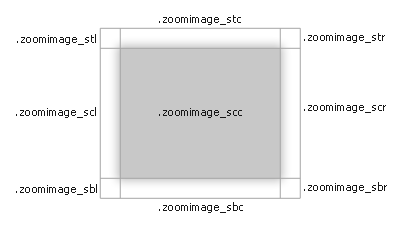
Each CSS class takes care of that specific region of shadow. You have change the size and place the background image in this classes.
每个CSS类负责一个特定区域的阴影。你可以在类中改变背景图片的位置和大小。