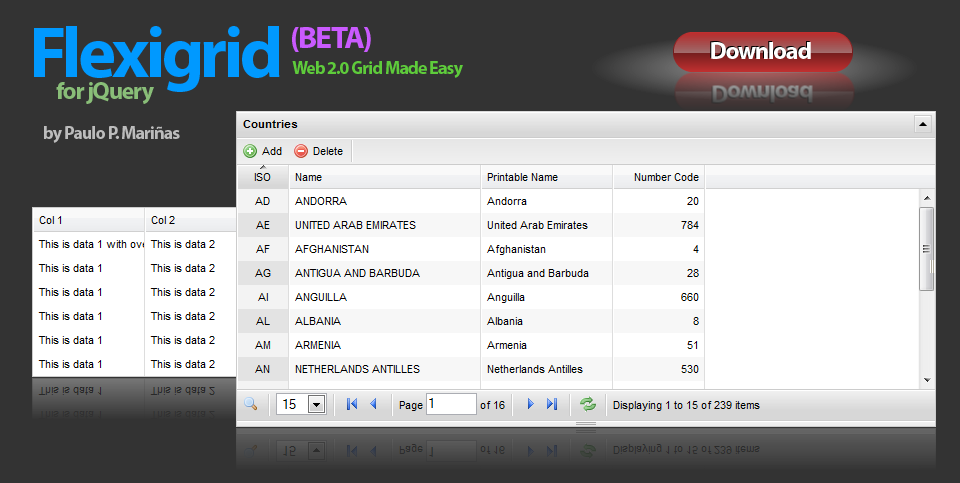
Lightweight but rich data grid with resizable columns and a scrolling data to match the headers, plus an ability to connect to an xml based data source using Ajax to load the content.
Similar in concept with the Ext Grid only its pure jQuery love, which makes it light weight and follows the jQuery mantra of running with the least amount of configuration.
Features
I'm planning to add an Editable and Resortable rows feature, as well as other cool GUI features.
One of my main goal for the plugin is ultimately to keep it lightweight, maybe under 20k when compressed. Because otherwise you should probably stick with Ext Grid or YUI data table.
As I still don't have time to build a full pledge support or community site, which I'm planning to, these are usually the questions I receive:
My appologies, but no time to make a thorough guide on how to use it yet, but I did make some examples below.
For the Third example you need to generate an XML file with a very specific format, just use the same format to generate an XML file using any backend programming language.
And due to consistent public demand. My sample PHP code for post.php. Please don't forget to change hostname, username, password and dbname.
function runSQL($rsql) {
$connect = mysql_connect($hostname,$username,$password) or die ("Error: could not connect to database");
$db = mysql_select_db($dbname);
$result = mysql_query($rsql) or die ('test');
return $result;
mysql_close($connect);
}
function countRec($fname,$tname) {
$sql = "SELECT count($fname) FROM $tname ";
$result = runSQL($sql);
while ($row = mysql_fetch_array($result)) {
return $row[0];
}
}
$page = $_POST['page'];
$rp = $_POST['rp'];
$sortname = $_POST['sortname'];
$sortorder = $_POST['sortorder'];
if (!$sortname) $sortname = 'name';
if (!$sortorder) $sortorder = 'desc';
$sort = "ORDER BY $sortname $sortorder";
if (!$page) $page = 1;
if (!$rp) $rp = 10;
$start = (($page-1) * $rp);
$limit = "LIMIT $start, $rp";
$sql = "SELECT iso,name,printable_name,iso3,numcode FROM country $sort $limit";
$result = runSQL($sql);
$total = countRec('iso','country');
header("Expires: Mon, 26 Jul 1997 05:00:00 GMT" );
header("Last-Modified: " . gmdate( "D, d M Y H:i:s" ) . "GMT" );
header("Cache-Control: no-cache, must-revalidate" );
header("Pragma: no-cache" );
header("Content-type: text/xml");
$xml = "<?xml version=\"1.0\" encoding=\"utf-8\"?>\n";
$xml .= "<rows>";
$xml .= "<page>$page</page>";
$xml .= "<total>$total</total>";
while ($row = mysql_fetch_array($result)) {
$xml .= "<row id='".$row['iso']."'>";
$xml .= "<cell><![CDATA[".$row['iso']."]]></cell>";
$xml .= "<cell><![CDATA[".utf8_encode($row['name'])."]]></cell>";
$xml .= "<cell><![CDATA[".utf8_encode($row['printable_name'])."]]></cell>";
$xml .= "<cell><![CDATA[".utf8_encode($row['iso3'])."]]></cell>";
$xml .= "<cell><![CDATA[".utf8_encode($row['numcode'])."]]></cell>";
$xml .= "</row>";
}
$xml .= "</rows>";
echo $xml;
function runSQL($rsql) {
$connect = mysql_connect($hostname,$username,$password) or die ("Error: could not connect to database");
$db = mysql_select_db($dbname);
$result = mysql_query($rsql) or die ('test');
return $result;
mysql_close($connect);
}
function countRec($fname,$tname) {
$sql = "SELECT count($fname) FROM $tname ";
$result = runSQL($sql);
while ($row = mysql_fetch_array($result)) {
return $row[0];
}
}
$page = $_POST['page'];
$rp = $_POST['rp'];
$sortname = $_POST['sortname'];
$sortorder = $_POST['sortorder'];
if (!$sortname) $sortname = 'name';
if (!$sortorder) $sortorder = 'desc';
$sort = "ORDER BY $sortname $sortorder";
if (!$page) $page = 1;
if (!$rp) $rp = 10;
$start = (($page-1) * $rp);
$limit = "LIMIT $start, $rp";
$sql = "SELECT iso,name,printable_name,iso3,numcode FROM country $sort $limit";
$result = runSQL($sql);
$total = countRec('iso','country');
header("Expires: Mon, 26 Jul 1997 05:00:00 GMT" );
header("Last-Modified: " . gmdate( "D, d M Y H:i:s" ) . "GMT" );
header("Cache-Control: no-cache, must-revalidate" );
header("Pragma: no-cache" );
header("Content-type: text/x-json");
$json = "";
$json .= "{\n";
$json .= "page: $page,\n";
$json .= "total: $total,\n";
$json .= "rows: [";
$rc = false;
while ($row = mysql_fetch_array($result)) {
if ($rc) $json .= ",";
$json .= "\n{";
$json .= "id:'".$row['iso']."',";
$json .= "cell:['".$row['iso']."'";
$json .= ",'".addslashes($row['name'])."'";
$json .= ",'".addslashes($row['printable_name'])."'";
$json .= ",'".addslashes($row['iso3'])."'";
$json .= ",'".addslashes($row['numcode'])."']";
$json .= "}";
$rc = true;
}
$json .= "]\n";
$json .= "}";
echo $json;
The most basic example with the zero configuration, with a table converted into flexigrid (Show sample code)
$('.flexme').flexigrid();
| Col 1 | Col 2 | Col 3 is a long header name | Col 4 |
|---|---|---|---|
| This is data 1 with overflowing content | This is data 2 | This is data 3 | This is data 4 |
| This is data 1 | This is data 2 | This is data 3 | This is data 4 |
| This is data 1 | This is data 2 | This is data 3 | This is data 4 |
| This is data 1 | This is data 2 | This is data 3 | This is data 4 |
| This is data 1 | This is data 2 | This is data 3 | This is data 4 |
| This is data 1 | This is data 2 | This is data 3 | This is data 4 |
| This is data 1 | This is data 2 | This is data 3 | This is data 4 |
| This is data 1 | This is data 2 | This is data 3 | This is data 4 |
| This is data 1 | This is data 2 | This is data 3 | This is data 4 |
| This is data 1 | This is data 2 | This is data 3 | This is data 4 |
| This is data 1 | This is data 2 | This is data 3 | This is data 4 |
| This is data 1 | This is data 2 | This is data 3 | This is data 4 |
Table converted into flexigrid with height, and width set to auto, stripes remove. (Show sample code)
$('.flexme2').flexigrid({height:'auto',striped:false});
| Col 1 | Col 2 | Col 3 is a long header name | Col 4 |
|---|---|---|---|
| This is data 1 with overflowing content | This is data 2 | This is data 3 | This is data 4 |
| This is data 1 | This is data 2 | This is data 3 | This is data 4 |
| This is data 1 | This is data 2 | This is data 3 | This is data 4 |
| This is data 1 | This is data 2 | This is data 3 | This is data 4 |
| This is data 1 | This is data 2 | This is data 3 | This is data 4 |
| This is data 1 | This is data 2 | This is data 3 | This is data 4 |
Flexigrid with a dynamic data, paging, search, toolbar, and connected to an JSON file. (Show sample code)
			$("#flex1").flexigrid
			(
			{
			url: 'post2.php',
			dataType: 'json',
			colModel : [
				{display: 'ISO', name : 'iso', width : 40, sortable : true, align: 'center'},
				{display: 'Name', name : 'name', width : 180, sortable : true, align: 'left'},
				{display: 'Printable Name', name : 'printable_name', width : 120, sortable : true, align: 'left'},
				{display: 'ISO3', name : 'iso3', width : 130, sortable : true, align: 'left', hide: true},
				{display: 'Number Code', name : 'numcode', width : 80, sortable : true, align: 'right'}
				],
			buttons : [
				{name: 'Add', bclass: 'add', onpress : test},
				{name: 'Delete', bclass: 'delete', onpress : test},
				{separator: true}
				],
			searchitems : [
				{display: 'ISO', name : 'iso'},
				{display: 'Name', name : 'name', isdefault: true}
				],
			sortname: "iso",
			sortorder: "asc",
			usepager: true,
			title: 'Countries',
			useRp: true,
			rp: 15,
			showTableToggleBtn: true,
			width: 700,
			height: 200
			}
			);